Enterprise hosting · Built for gamers
Maincubes FRA01Data center Offenbach / Frankfurt
~12 msAvg. ping DACH
1 Tbit/sDDoS protection
99.9%Uptime SLA
28+ games1-click install
Popular searches:Minecraft won't startCreate Minecraft serverHytale server 2026Rent game server DEProject ZomboidFiveM txAdminVPS GermanyOpen port 25565Discord bot hostingDNS troubleshooting
Set Up Cloudflare DNS – CDN, Nameservers & Improve Performance
Quick answer: Cloudflare offers free CDN, DDoS protection and fast DNS – often under 10 ms response time. Set up correctly you significantly improve load times, Core Web Vitals and Google rankings.
When is Cloudflare worth it?
- WordPress or shop websites with international traffic
- Slow load times (PageSpeed score below 70)
- Core Web Vitals issues (LCP, CLS)
- DDoS protection needed
Set up Cloudflare – step by step
- Create account at cloudflare.com (Free plan is enough)
- Add domain → Cloudflare scans existing DNS records
- Verify records! Add missing MX, TXT, A records manually
- Note nameservers → enter at registrar → Nameserver guide
- Set SSL mode: Full or Full (strict)
- Enable performance features
Proxy mode: Orange vs grey cloud
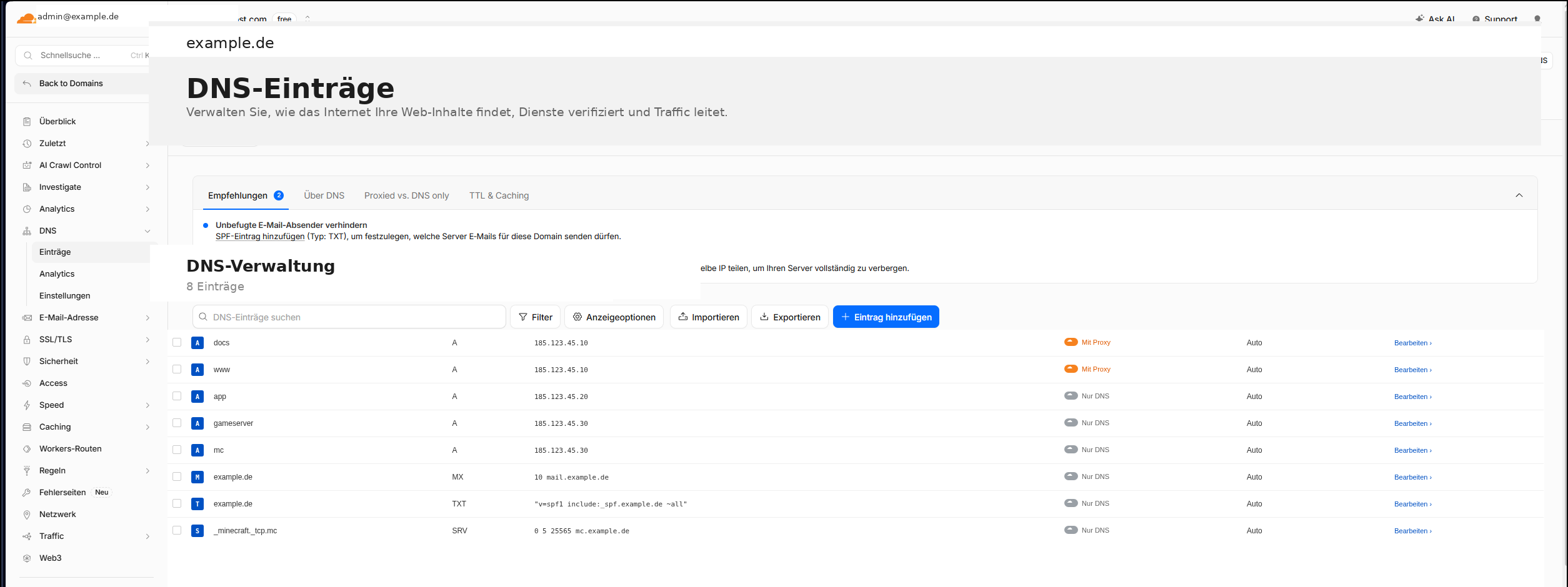
| Mode | What happens? | When to use? |
|---|---|---|
| Proxied (orange) | Traffic via Cloudflare CDN, IP hidden | Website A/CNAME records |
| DNS only (grey) | DNS only, no CDN | MX, SPF, DKIM, mail, FTP, game servers |
Common Cloudflare errors
| Error | Cause | Fix |
|---|---|---|
| 521 | Origin unreachable | Server online? Firewall port 443 open? |
| 522 | Connection timeout | Whitelist Cloudflare IPs in firewall |
| 525 | SSL handshake failed | Set SSL mode to Full, check certificate |
Related guides
Frequently asked questions (FAQ)
Is Cloudflare really free?
Yes, the Free plan is enough for most websites: CDN, DDoS protection, DNS, SSL. Paid features (Argo, Workers) are optional.
Does Cloudflare improve my Google ranking?
Indirectly yes – faster load times and better Core Web Vitals are ranking factors. Cloudflare alone doesn't guarantee ranking but helps with performance.
Can I use Cloudflare for game servers?
Limited. Cloudflare proxy only supports HTTP/HTTPS. Game servers need UDP/TCP directly – set A record to DNS only (grey), no proxy.
NexoraHost
Register a domain
Connect your domain to webspace, email or game server – unlimited DNS records.
nexorahost.com · Maincubes FRA01 · 1 Tbit/s DDoS · 99,9 % Uptime