Enterprise hosting · Built for gamers
Maincubes FRA01Data center Offenbach / Frankfurt
~12 msAvg. ping DACH
1 Tbit/sDDoS protection
99.9%Uptime SLA
28+ games1-click install
Popular searches:Minecraft won't startCreate Minecraft serverHytale server 2026Rent game server DEProject ZomboidFiveM txAdminVPS GermanyOpen port 25565Discord bot hostingDNS troubleshooting
Set Up Minecraft SRV Record – Connect Server via Domain Without Port
Quick answer: With an SRV record players connect using mc.yourdomain.com instead of 192.168.1.1:25565. The SRV record automatically tells the client IP and port – more professional and easier for players.
Why SRV record instead of IP only?
| IP + port only | Domain + SRV record | |
|---|---|---|
| Players enter | 192.168.1.1:25565 | mc.yourdomain.com |
| On IP change | Inform all players | Just change A record |
| Professional | ❌ | ✅ |
Set up SRV record – step by step
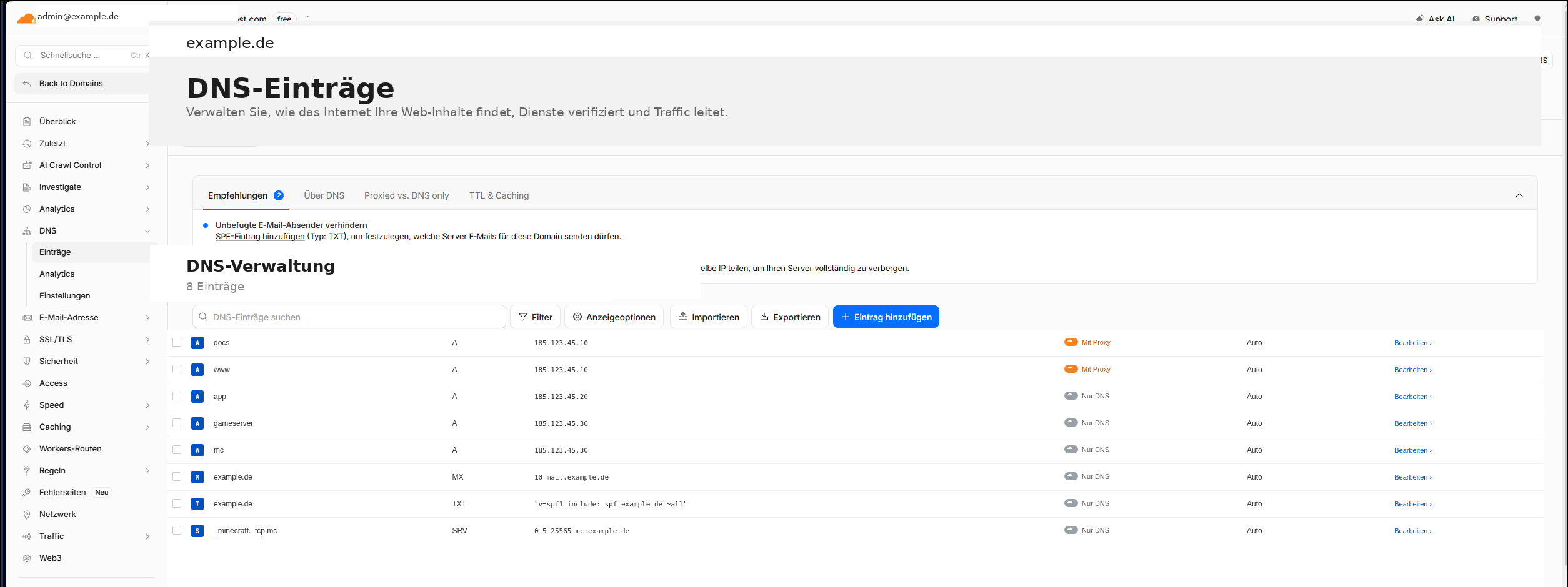
Step 1: A record for subdomain
Type:  A
Name:  mc
Value: 192.168.1.100
TTL:   3600
Step 2: SRV record for Minecraft
Type:     SRV
Name:     _minecraft._tcp.mc
Priority: 0
Weight:   5
Port:     25565
Target:   mc.yourdomain.com
TTL:      3600
Step 3: Test
- Minecraft Java Edition → Multiplayer → Add Server
- Address:
mc.yourdomain.com(no port!) - Connect
Java vs Bedrock
| Edition | SRV service | Default port | SRV works? |
|---|---|---|---|
| Java Edition | _minecraft._tcp | 25565 | ✅ Yes |
| Bedrock Edition | _minecraft._udp | 19132 | ⚠️ Limited |
Related guides
Frequently asked questions (FAQ)
Do players still need the port with SRV configured?
No – with correct SRV record players only connect with mc.yourdomain.com. The client reads port 25565 automatically from the SRV record.
Does SRV work with Bedrock Edition?
Limited. Bedrock uses _minecraft._udp on port 19132. Many Bedrock clients don't reliably support SRV – A record + port recommended there.
Can I run multiple Minecraft servers via domain?
Yes – each subdomain (survival., creative., skyblock.) gets its own A record and SRV record with different port.
NexoraHost
Register a domain
Connect your domain to webspace, email or game server – unlimited DNS records.
nexorahost.com · Maincubes FRA01 · 1 Tbit/s DDoS · 99,9 % Uptime